
Cat5 Cable Guide: Features, Uses & Buying Tips
Jul 29, 2025
Homes and offices used to use Cat5 cables. They are cheap, simple to set up and yet they can still take care of the basic network requirements, so are they worth using today? This guide describes what a Cat5 cable is, how fast it is, and what to know before you purchase.
What Is a Cat5 Cable?
Cat5 (an abbreviation of Category 5) is a kind of a twisted pair network cable that transmits data, voice and video. It is the previous specification of Ethernet connections, and although it is an older technology, it is still being used in most buildings, particularly the basic internet connection, telephone system or cheap network connections.
The newer Cat5e (Cat5 with the e standing for enhanced) was used in most new installations after 2001, and is replacing standard Cat5. It facilitates higher speeds and minimizes signal interferences, or as it is called, crosstalk.

Why do People Still Use Cat5 Cables Today?
Although faster cables such as the Cat6 and Cat6a are in the market, people continue to use Cat5 and Cat5e cables because they:
● Affordable
● Quick to set up
● Stable with basic internet connections, streaming, and VoIP setups
Nowadays Cat5e (e is short for enhanced) is more prevalent. It minimizes interference and allows superior speeds compared to Cat5. Unless you know the type of cable you have, it is most probably Cat5 or Cat5e both of which are still good enough to use in everyday life.
Cat5 Cable Speed and Distance: How Fast and How Far Can It Go?
The speed and distance limits of a Cat5 cable are significant when you are configuring your network. The following is what you should know:
| Cable Type | Maximum Speed | Frequency | Best Use |
|---|---|---|---|
| Cat5 | 100 Mbps | 100 MHz | Earlier networks, VoIP |
| Cat5e | 1 Gbps | 100 MHz | Homes, small business |
In optimal conditions, Cat5e can also support 2.5 Gbps at shorter distances, but that is not a given.
What is the Maximum Cable Length?
● Total maximum = 100 meters (328 feet)
● That is usually:
○In-wall solid cable 90 meters
○ Each end has 5 meters of patch cable
Yes, certainly, it is quite safe to use 50 ft Cat5 Ethernet cable or 25 feet Cat5 cable.
In case you are having slow speeds, check the length of the cable and ensure you use Cat5e to have a faster performance.
Cat5 Cable vs Cat5e vs Cat6: What’s the Best Choice for You?
Selecting the appropriate Ethernet cable would depend on your requirement and future expectations in terms of the internet. The simplified breakdown is as follows:
● Cat5: Suitable enough on simple activities such as VoIP or antique devices
● Cat5e: Best suited to the majority of homes - Gigabit capable and crosstalk reduction
● Cat6: The best fit for high-speed internet (up to 10 Gbps) and network future-proofing
Cat6 is worth consideration when you are putting in place a new network or upgrading cables behind the walls. However, Cat5e is a great value as well if you are merely replacing a few cords or are on a limited budget.
Cat5e is the sweet spot nowadays: it is fast, inexpensive and backward-compatible with older and newer devices.

Cat5 Cable Wiring Diagram and Wire Color Standards Explained
Each Cat5 cable has eight small wires, which are combined in four color-coded twisted pairs. These wires must be connected in the right way to make this cable functional.

There are two Standard Wiring Schemes:
● T568A
● T568B (more popular in the U.S.)
Both are correct - make sure that both ends of your cable are the same standard unless you specifically want a crossover cable.
T568A Wire Color Code:
1. White/Green
2. Green
3. White/Orange
4. Blue
5. White/Blue
6. Orange
7. White/Brown
8. Brown
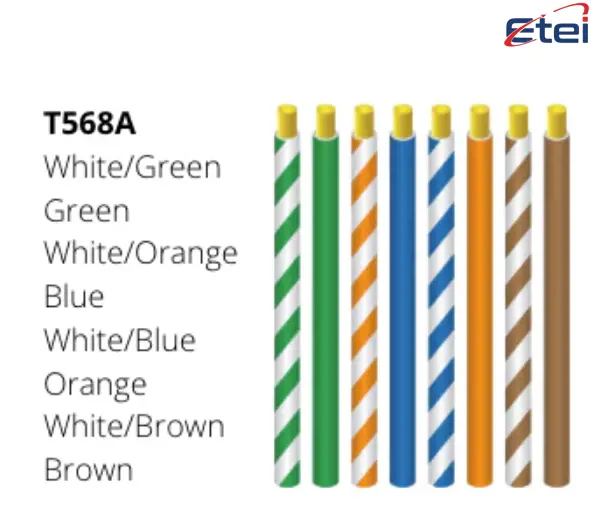
T568B Wire Color Code:
1. White/Orange
2. Orange
3. White/Green
4. Blue
5. White/Blue
6. Green
7. White/Brown
8. Brown
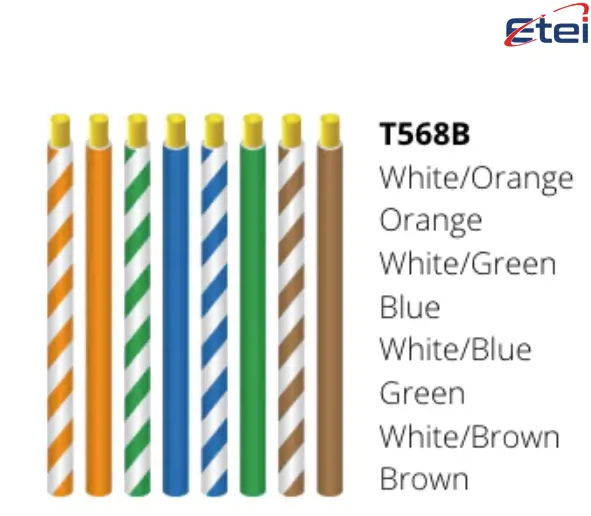
When you are creating your own cables or fixing one, make sure you consult a Cat5 wiring diagram and test your connections using a cable tester.
Unless you need a crossover cable to suit special equipment, do not mix T568A and T568B.
How to Install and Remove a Cat5 Cable the Right Way
The process of Cat5 cable installation/removal appears very easy, but proper installation does matter a lot in the quality of signal handled and life of cable.
Cat5 Cable Installation Tips:
● Long runs in wall should be solid-core Cat5, which is more stable
● Flexible patch cables should be made of stranded Cat5 and connect to devices
● Do not be more than 100 meters long all together
● Avoid sharp turns - bend radius should be not less than 4 times the cable diameter
● Avoid electricity lines by routing around them
Cat5e is simple to install with simple tools whether you use walls, ceilings or baseboards. It is affordable and easy to do by many DIYers.
Removing Cat5 Cable in a Safe Way:
1. Find the plug (an 8P8C modular connector -- commonly mis-labeled as RJ45
2. Push the plastic tab to open it
3. Pull at the plug head - never yank the cable
4. In case it sticks, check again that the tab is depressed completely
An improper removal may break the port or connector, so unplug it slowly.
How to Choose the Right Cat5 Cable (and Avoid Fakes)
Purchasing a cheap Cat5 cable will save you money on the spot, but it may end up costing you in bad signal, overheating or even connection loss.
Detection of a Fake Cat5 Cable:
● Most of the fake cables are made of copper-clad aluminum (CCA) rather than pure copper
● CCA cables:
● Reduce performance
● Have the tendency to overheat
● They often break in transfer of data
● May break building codes
What to Look out:
● The label must be marked: 24 AWG, Solid Copper
● Stay away of cables that are not printed with specs
● Check the quality of the signal with a Cat5 cable tester in case it is necessary
How to Purchase a Good Cat5 Cable:
Search quality in purchase:
● Use Cat5e to have a higher performance
● It should be of pure copper conductors
● Look at fire safety ratings: CM, CMR, or CMP to be used in wall or plenum
● Use a length that is appropriate to your installation e.g. 50 ft Cat5 Ethernet cable to connect long distances or 25 feet Cat5 to connect to devices
Recommended retailers:
● Amazon (see checked reviews)
● Newegg
● Electronics/computer stores in the local area
Never purchase anything without checking with reliable sellers, reading trusted customer feedback and examining cable specifications. This will be long term reliable and in line with the safety standards.
Conclusion
Cat5 cables are still a solid, affordable solution to home and small office networks. Knowing their types, installation, and quality standards, you can install, purchase, or repair them without any difficulties so that the internet connection will be fast and stable, and without any unneeded complications.
FAQs
1. Is it possible to combine Cat5, Cat5e and Cat6?
Yes, but you are hampered by the slowest cable in your entire set up. When one of them is Cat5, the whole thing becomes slow. To perform optimally, use the same type of cable.
2. Will Cat5e really increase your speed?
You can make it faster with Cat5e, provided your gadgets are compatible. It is less time consuming than Cat5 and it is more resistant to interference. However, the upgrade will not be of much use when you have slow internet.
3. Does Cat5 cables require special tools to install?
All you need is a cable cutter, a crimper, and a tester. Fish tape or wall plates may be required in wall runs. It is an achievable DIY provided that you abide by wiring standards.
4. Can Cat5 cables be used outside?
It could be only when the cable is rated outdoor. The normal Cat5 deteriorates under the sun and water. They should be direct-burial or weatherproof.
5. What is the way of determining whether your cable is Cat5 or Cat5e?
Read the writing on the cable jacket-it will say. In case it is absent or not clear, check the speed of your network. More than 100 Mbps probably signifies that it is Cat5e.
유사 상품
Flip-flops are digital circuits that sto..

Sensors detect changes in the environmen..
Oscillators are circuits that generate r..

Thermopiles are sensors that convert hea..

CR123 and CR123A batteries are the same ..

The L1154F is an alkaline button cell, s..
인기

Telephone cables (RJ11) connect landline..

AG10 battery equivalents include 189, LR..

Battery testers check battery health by ..

Switch poles control how many circuits a..

Learn how to strip a wire safely and eff..